






# HEX Milling MACRO: Mastering Hexagonal Milling with CNC Macros
In the world of CNC machining, efficiency and precision are everything. One of the most powerful tools in a machinist’s arsenal is the ability to write and utilize macros — and when it comes to milling hexagonal shapes, a well-crafted macro can save enormous amounts of time while delivering flawless results every single time.
In this post, we’ll dive into the concept of HEX milling macros, why they matter, and how they can transform your CNC workflow.
## What Is a HEX Milling Macro?
A HEX milling macro is a custom CNC program — typically written using parametric programming (such as Fanuc Macro B or similar systems) — that automates the process of milling hexagonal features. Whether you’re cutting hex pockets, hex bosses, or hex bolt heads, a macro allows you to define the operation once and then call it repeatedly with different parameters.
Instead of manually programming each side of the hexagon, calculating tool paths, and managing approach angles, a macro handles all of the math and motion for you.
## Why Use a Macro for Hex Milling?
Hexagonal shapes are common in manufacturing — from bolt heads and nuts to custom fittings and decorative features. Here’s why a macro approach is superior to manual programming:
### 1. **Speed and Efficiency**
Once your macro is written and proven out, you can mill hex features in seconds. Simply input your parameters — such as the flat-to-flat dimension, depth, and center location — and let the macro do the rest.
### 2. **Consistency and Accuracy**
A macro eliminates the risk of human calculation errors. The trigonometric calculations needed to define the six sides of a hexagon are handled automatically, ensuring perfect geometry every time.
### 3. **Flexibility**
Need to change the size of the hex? Simply adjust a variable. A well-designed macro is parametric, meaning it can adapt to virtually any hex size without rewriting a single line of core code.
### 4. **Reduced Programming Time**
For shops that frequently machine hex features, having a ready-to-go macro eliminates repetitive programming tasks and frees up valuable time for other work.
## The Math Behind the Hex
At its core, a hexagon is defined by six equally spaced vertices arranged around a center point. The key relationships include:
– **Interior angle between vertices:** 60 degrees
– **Flat-to-flat distance (AF):** The distance across the flats, commonly used for wrench sizes
– **Corner-to-corner distance (AC):** AF ÷ cos(30°)
– **Circumscribed radius:** Half of the corner-to-corner distance
A macro uses these relationships along with sine and cosine functions to calculate each vertex position and generate the tool path automatically. Variables like `#1`, `#2`, and `#3` in Fanuc-style programming can represent the hex size, depth of cut, and center coordinates respectively.
## Key Considerations When Writing a HEX Milling Macro
### Tool Diameter Compensation
Your macro needs to account for the diameter of the end mill being used. Cutter compensation (G41/G42) or built-in offset calculations ensure the finished hex matches the programmed dimensions.
### Approach and Retract Moves
Smooth entry and exit moves prevent tool marks and ensure clean corners. Many macros incorporate arc lead-in and lead-out moves for a professional finish.
### Depth of Cut Management
For deeper hex features, the macro should include logic for multiple passes at incremental depths, protecting both the tool and the workpiece.
### Feed Rate and Speed Optimization
Parametric macros can also include variables for feed rate and spindle speed, allowing quick adjustments based on material type and tooling.
## Watching It in Action
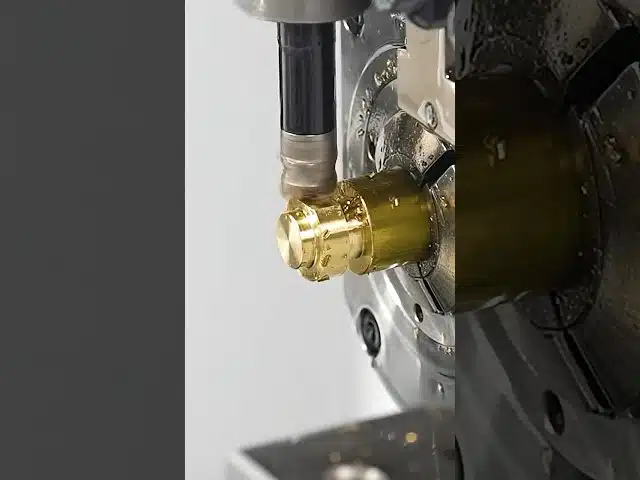
For a great visual demonstration of a HEX milling macro in action, check out this video from **Donnie Hinske**:
[HEX Milling MACRO](https://www.youtube.com/watch?v=kieCxv0T5WI)
Donnie’s video showcases the power of macro programming applied to hexagonal milling operations, demonstrating how clean and efficient the process can be when the programming is dialed in. It’s an excellent resource for machinists looking to level up their CNC programming skills.
## Getting Started with Your Own HEX Macro
If you’re ready to create your own HEX milling macro, here are some steps to get started:
1. **Define your parameters:** What variables do you need? (Hex size, depth, center X/Y, feed rate, etc.)
2. **Do the math:** Map out the trigonometric calculations for the hex vertices.
3. **Write the code:** Start with a simple single-pass version and test thoroughly.
4. **Add complexity:** Incorporate multi-pass depth logic, cutter compensation, and lead-in/lead-out moves.
5. **Test and prove out:** Always run your macro in single block mode first and verify dimensions with precision measuring tools.
## Final Thoughts
HEX milling macros represent one of the best examples of how parametric programming can elevate CNC machining from a manual, repetitive process to an automated, intelligent one. Whether you’re a job shop running one-off parts or a production facility cranking out thousands of hex features, investing time in macro development pays dividends in quality, speed, and consistency.
The ability to write effective macros is a skill that separates good machinists from great ones. If you haven’t explored macro programming yet, hex milling is a perfect place to start — the geometry is well-defined, the math is manageable, and the results are immediately satisfying.
Happy machining!
What Should I Do Right Now?
If you’re evaluating new machining processes or equipment, our team can help you determine the best approach for your specific parts, offering guidance, insights, and practical recommendations based on your production needs and goals. Whether you’re optimizing existing workflows or exploring new manufacturing methods, we’re here to support your decision-making.


You Might Also Like
Fixing Titanium Forgings with CNC Machining: Challenges, Techniques & Expert Tips
# Fixing Titanium Forgings: The Art and Science of CNC Machining Titanium forgings are among the most challenging workpieces in the world of CNC machining.…
EATER of Titanium: Watch This CNC Machine Devour Titanium Like Butter
# EATER of Titanium: The CNC Machine That Devours the Toughest Metal There’s something deeply satisfying about watching a CNC machine tear through titanium like…
Crazy Titanium CNC Machining Part – Day 1 | Donnie Hinske’s Epic Build
# Crazy Titanium Part | Day 1: The CNC Machining Journey Begins There’s something deeply satisfying about watching raw titanium transform into a precision-engineered component…